Pages

Showing posts with label with. Show all posts

Wednesday, August 31, 2016

How to Download YouTube video directly from the UC Browser

There are number of Tricks and Tips accessible over the web about how to download YouTube video from UC browser. But in this post I am going to give a straightforward and simple approach to download YouTube Video from UC Browser. this is not any  trick, UC browser gives this option in its new version. before going to begin tutorial we must need to Know about UC Browser.

What is UC Browser - I think everyone comprehends what is UC, So I dont make it so long, In short UC Browser is a standout amongst the most mobile web browser, It is a free internet browser. furthermore it gives full desktop like searching experience on a Smartphone. UC quickens your browsing by compressing pages on the server, and pre loading pages in the background.

Speed Mode in UC Browser gives various options to enhance the  browsing speed of your most loved  website - Facebook , Google+, Twitter, Yahoo and Other.

Download management becomes very easy with new version of the UC browser, that support multi tasking downloading and Udisk Downloading.

Themes option also helps you to customize the look and feel of UC by downloading Themes and wallpaper from the UC theme center.

Add - On platform - This is the best thing about UC browser, Number of Add-on available to get advanced personalized internet browsing experience. For this tutorial, we require one of UC add-on named as Video Down-loader. with the help of this UC extension we easily download  YouTube video from UC Browser.
This tutorial is tried on full/regular version of UC browser,  Not on UC browser    ( lite ), This tutorial require add - on support for UC browser.
Required Add-On: Video Downloader.

Tutorial - How to download YouTube video from UC browser


Step 1: Download Latest UC browser on Your Android Mobile.

Step 2: Open UC browser and afterward tap on the right corner of the UC. after that side bar screen shows up, ----> on that screen click on " + " sign which is arranged beneath of all add-on.
How to Download YouTube video directly from the UC Browser screnshot step 1

Step 3: After few second new page show up with all UC add on ; look for  " Video Downloader " add on, once you search it then tap on " install"  button -> pop up screen with a confirmation message is appear, -----> click " Ok " on that Screen.

How to Download YouTube video directly from the UC Browser screnshot step 3

-----> After that install Video Downloader add-on from UC Download manager.and check it ( for Properly Install or Not )
How to Download YouTube video directly from the UC Browser screnshot step 1

Step 4: After completion above step, open YouTube website in UC browser and select video for download.
Step 5: Start video streaming/ tab on video screen ----->  after this download button appears on the right side of the video,---> then just click on that Download button to begin video download ( You may Pause video Once the download button appear ).
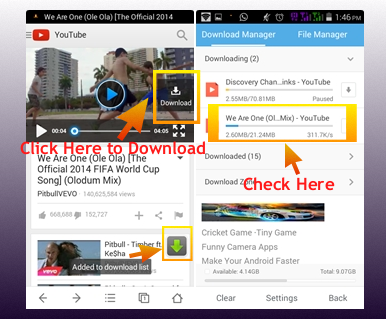
How to Download YouTube video directly from the UC Browser screnshot step 4


Download : Video Downloader for UC (Updated on 18/08/2014)
UC  browser gives quicker download experience, so it is more enjoyable to download YouTube video specifically from UC.
Then why you are waiting for ? - try it and feel it !  furthermore one more thing, please share your feeling about this with us.
Read More..

Micromax Canvas Magnus A117 Feature Specification and Price

The Indian Mobile Manufacturer Micromax  commences new Mid Range Smartphone from its thriving Canvas series entitled as Canvas Magnus A117 before the upcoming Diwali Festival
to  appeal more and more customer, Canvas Magnus A117 is yet to be officially launched, it is accessible on Snapdeal at about Rs 14,999

It is a Dual SIM (GSM + GSM ) and has WI-Fi, Bluetooth, 3G , 2G, , USB, GPS/ AGP as connectivity options.

Micromax Canvas Magnus A117 Feature , Specification and Price
Micromax Canvas Magnus A117

The Micromax Canvas Magnus characteristics at 5" IPS Multi - Touch display with a 720*1280 pixels resolution and it is running on Android 4.2 Jelly Bean Operating System.
It is impelled by a 1.5 GHz Quad - Core processor along with with 1GB of RAM.

It allows user to capture HD video Recording with its 12-megapixel rear camera with LED flash and It also has a 2-megapixel front facing camera.
It comes with a 2000mAh battery,
It has 4GB of internal storage and external storage expandable up to 32GB via MicroSD card slot.


Key Specification of Micromax Canvas Magnus A117 are given below:


Name Micromax Canvas Magnus A117
ManufracturerMicromax
SIM SupportDual-SIM (GSM+GSM)
Display5" IPS, Resolution1280*720 Pixel, Multi Touch
Sensors: Light Sensor, Motion Sensor, Proximity
ConnectivityWi-Fi, GPS/AGPS, Bluetooth 4.0, and 3G
USB port
Audio JackYes 3.5mm
VideoHD Video Recording
CameraRear: 12MegaPixel with LED flash
Front: 2MP
Battery 2000 mAh
Processor1.5 GHz Quad - Core
RAM: 1 GB
Storage:4 GB
ExternalExpandable Up to 32GB via microSD Card Slot
Operating SystemAndroid v 4.2 Jelly Bean
Business and Personal Email, IM, MMS, Phonebook,
PriceRs 14,999


Source: @MMXNewscaster,Img Source: Snapdeal
Read More..

Saturday, August 20, 2016

The World Ends With You APK OBB

worldendswithyou-cover.jpg
Name : The World Ends With You
Version : 1.0.1
Genre : Arcade
Vendor : SQUARE ENIX Co.,Ltd.
Platform : Android
File Type : Rar
File Size : 700 Mb
Status : -
Category : Games Android!
Screenshots

worldendswithyou-01.jpg
worldendswithyou-02.jpg
worldendswithyou-03.jpg
worldendswithyou-04.jpg
worldendswithyou-05.jpg
Android 4.0 and up

HVGA, WVGA, TAB
ARMv7

APK+Data | TWEWY v1.0.1
Part1 Part2 Part3 Part4

how to install

Cara Install:

1. Install APK
2. Copy folder "com.square_enix.android_googleplay.subarashikikonosekai_solo" ke sdcard/Android/obb/

3. Jalankan Game & Mainkan
Read More..

Tuesday, August 2, 2016

BlackBerry Messenger BBM Now available For Android and iOS

Finally the long awaited Cross - Platform BBM - BlackBerry Messenger apps commences for Android and iOS on Monday,But still it is not available for all users ,
BBM will made accessible on First come first serve basis, to apply this BlackBerry has put in a location a virtual line up system to double-check a glossy roll-out
BlackBerry Messenger for Android and iPhone
BBM Logo

Users who had previously signed up for  BBM will get first fondness and the remaining user should wait in line for the BBM
Beside about 6 millions persons are signed up for information about BBM at BBM.com and In juts 7 hour 1 million Android users were utilizing the unreleased version of BBM for Android According to BBM official blog Post
BBM Roll Out Details
Download BBM on your Device by visiting to BBM.com from your Android or iPhone browser, Install app --> Open it and enter your email address and wait in line until BlackBerry inform you about to use the BBM app

For Android: visit Here from your wireless Browser
For iPhone: visit Here from your mobile Browser

BBM Features:
Stay always connected with your Friends on your: iPhone  BlackBerry and Android
Real Time Chat
Create group
Message consignment and Read report
Share Files , Images, articles and More effortlessly and Freely
Emoticons for every feeling
BBM Profile
Multi - person chats
drive a message to multiple BBM communicate at one time
Privacy command
Multiple language Support

BBM Info


AndroidiPhone
App NameBBM - BlackBerry MessengerBBM - BlackBerry Messenger
Developer NameBlackBerry LimitedBlackBerry Limited
Current Version1.0.0.701.0.1.108
CategoryCommunication/MessengerCommunication/Messenger
LicenceFreewareFreeware
Size13MB30.9 MB
Platform SupportAndroid v 4.0 and aboveiOS 6.0 or later
PriceFreeFree


Img & Data Source:BlackBerry Official Blog and Google Play store and iTunes

Read More..

Tuesday, July 5, 2016

Personalize your Mobile with top 5 Android Launcher Apps

Android is a best operating system in term of customization,  This is the only reason why people love Android Phones, 
After few month of utilization each one get exhausted with the feel and look of their  mobiles home screen and  tired of gazing at the same old stock icons on  phone, they need something different. Dont Worry this is exceptionally easy to customize your  phones home screen as indicated by your need with the assistance of launcher applications.

Personalize your Android Mobile with top 5 Launcher Apps


The Launcher is an application which  change your mobiles home screen, text styles, animations and graphics,install custom widgets, and so forth ... also essentially give it an entire new look.

Many Launcher accessible on play store, just few of them are helpful and rich in gimmick. In this article I expound on the main 5 launchers for Android which I think everybody ought to attempt. Each of them is truly well known and has a great deal of potential. get more control over your phone by restyling it with beneath main 5 launcher applications.

  • Dodol Launcher for Android:

Dev : dodol.com
Price : Free
Download: Dodal launcher for Android

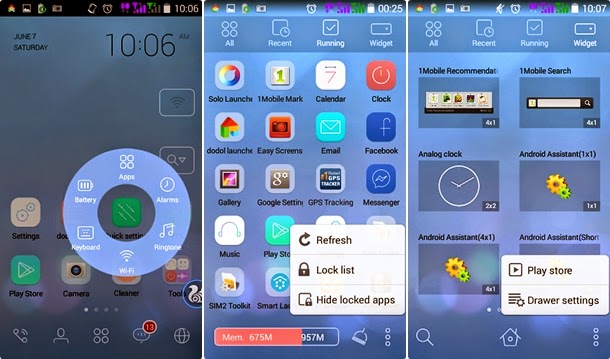
Dodal Launcher screenshot

Dodal is free launcher for your Android device, it provide a new and different appearance to your home screen, its versatile and straightforward to use, that smoothly enhance and modify the looks of your phone with simply one tap, thousands of themes accessible for Dodal launcher and app it self contain several improvement options like memory cleaner, battery status indicator, and far additional,
This launcher additionally permit you simply navigate through its dodal menu and youll be able to additionally change the icon pack, set home screen gestures, then theres the fast Launcher of recent apps available within the top notification window.
Dodal launcher comes with heap of best widgets-
Toolbar widget - this widget could be a  -quick toggles for wifi, mobile data, phone sound, screen timeout, torch and settings.
Extended search toolbar for searching Google, your app and contacts.
Quick Setting panel icon that showcases all the foremost used options of the device
The app drawer is additionally smartest thing regarding this launcher, App drawer incorporates four tabs - All, Recent, Running and widget - to give you access to your recently launched and currently running apps likewise. And youll be able to create a shortcut or widget on any of your home screens by merely dragging it from the App drawer and dropping it there, as you’d expect.
It is undoubtedly worth a try. Dodol Launcher is wealth of attractive themes, lock screens, backgrounds, icons and widgets

  • Solo Launcher for Android:

Dev : Solo Launcher Team
Price : Free
Download: Solo Launcher for Android

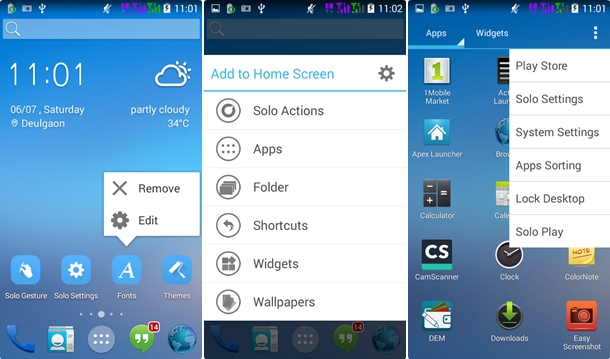
Solo Launcher screenshot

Solo launcher is another best free launcher available on play store for Android device, it has the look and feel of default Android Kitkat, rather than that - it accompanies hundred of personalization settings, thousand of themes, live wallpaper, lock screen and fonts.
Some peculiarity of Solo launcher is truly like Apex and Nova launcher, however it is more smoother and more productive than those launchers, Solo launcher has highly adaptable individual settings that incorporate :
You can easily import setting from different launchers and it also supports themes of GO Launcher EX, Nova launcher, ADW launcher Apex launcher and Holo launcher.
Solo supports 10 types of gesture and 16 types of folder,
Unread message count, quick open action for apps and widget, app hiding, transition effect for the home screen and app drawer. other most awesome feature of solo launcher is customized widget for weather, battery saver and a task manager .
With default look and feel of Android Kitkat Solo launcher offers various adaptable features which makes it the ideal option for inbuilt launcher. so in the event that you need to change the face of your phone  then you must give an attempt to Solo Launcher.
  • Go Launcher EX for Android:

Dev : GO Launcher Dev Team
Price : Free
Download: Go Launcher EX for Android

Go Launcher screenshot

I think theres no word to clarify the popularity of Go Launcher on Playstore, it is most counseled and downloaded app in its class. this launcher has ability to beat  default launcher by changing the interface of your device according to your need. Go Launcher offer following feature:
Thousands of themes and lock screen out there on Go themes for download, youll simply select one among them for your phone otherwise you might customise themes.
The auto folder feature permits you to classify apps in to different folders according to their use. it has multiple useful widget just like - Go weather, Go handbook, Ok Screen shot, timer, QR Scanner, flashlight and calender, some of them need to download from Go Store, add the app , change theme, wallpaper and effect by just one touch on home screen.
Edit or delete home screen, change icon size and style, use third party font or system font, change app label color and appearance, choose screen orientation, screens transition speed, scrolling style, indicator position,
The sidebar is the most unique feature of Go launcher, wherever you can simply select widget, manage the app, hide the app, download themes and clear recent activity, free version of the Go Launcher Ex offer restricted feature, for extra feature you will upgrade to go Launcher Prime. The free version offers multiple feature thats enough to take new experience on your mobile.
  • Nova Launcher for Android:

Dev : TeslaCoil Software
Price : Free
          Prime : $4
Download: Nova Launcher for Android

Nova Launcher Screenshot

Nova Launcher is one of the best  home screen replacement  for  Android 4.0 or higher , it is profoundly adjustable, simple to use and have a superior execution.
effective useful adaptability of Nova launcher incorporate different adaptable options, all these options are accessible in Nova settings.
When you explore Nova setting you uncover couple of choices, Desktop setting, Drawer setting, Dock setting, Folder, look and feel settings,
By accessing this setting you can easily modify and change your phones looks such as themes, icon size ,fonts, scroll effect, widget overlapping and placing, widget and app icon in dock etc.
By holding your finger on home screen you able to use Nova Action menu that include  toggle dock,voice search, expand notification toolbar and quick setting and more, with the help of Nova launcher you may add  Multiple apps to desktop,add shortcut, widget, change wallpaper and also edit and delete app with just a one tap
Nova launcher also support for Go Launcher/ADW Launcher icons, means you can import icons form other launchers.
In the dock menu, you can able to edit your dock height, margins, pages, and number of icons, and hide your dock altogether.
Free version of Nova launcher does not allow you to set up gestures, hide apps and it does not shows unread badges for dock,drawer and folder icons, for those feature you have to do upgrade to Nova Prime.
Due to the  above features Nova launcher become a  choice of millions of Android user and it should be good for those who looking to make things  more of their liking.

  • Apex Launcher for Android:

Dev : Android Does
Price : Free
Download: Apex launcher for Android

Apex Launcher screenshot

Apex  is a free launcher available for Android 4.0+ phone, which is closely resemble with Nova Launcher, near  about all the gimmicks of Apex is like Nova, If we number contrasts of Apex then we figure out that it offer a tablet mode as well as many home screen gesture settings in free version.
Some other peculiarity of Apex incorporate fancy transition effect, unending and flexible scrolling, adaptable home screen, scrollable dock and customizable icons.
Apex launcher also gives you a freedom to choose multiple drawer style, allow to hide app from the drawer, lock your home screen to prevent accidental changes, and you may easily back up and reset your data with Apex.
Apex launcher is a powerful app, which has a potential to completely change the look of your phone.


Few alternative launcher app for android

Smart Launcher: 

Smart launcher is utterly different launcher from all other launchers, its terribly easy, light and fast as compared to other.
The homescreen interface of Smart launcher gives you access of the most common apps. and also the drawer automatically organizes all of your apps into a few categories, so youll simply explore all the apps. thousands of themes and lockscreen accessible for smart launcher over play store, each theme assist you to refresh the look and feel of your device.


ADW. launcher:

This is a excellent package with variety of unique options, such as create group within the app drawer and mix and match functionality form different themes, it is compatible with Android version 1.6 to 4.1, support thousand of themes and gesture for quick operation.

Buzz launcher:

Buzz launcher is ad-free custom launcher that has over 400,000+ free themes, shareable home screens, customizable widgets, multiple smooth easy transition effects,

Holo Launcher: 

Holo Launcher is small package comes with massive options, its based on the Android Kitkat launcher. basic feature includes gesture support on desktop, full ICS style - icon, folder, drawer and tabs. it also supports ADW and Launcher pro icon pack, hide the label and hide apps.

Action launcher: 

Action launcher comes with various distinctive options and its additionally allowed you to import your existing layout from different launcher like nova, Apex, and stock launcher.
some other feature of Action launcher include Quickdrawer, Quick Page, Covers, and Shutters.

This is not the end of list still lots of home screen replacement still out there on play store, it was difficult to try each and every, so if you like different launcher that isnt included in my list then please share your thought with me.
Read More..

Tuesday, June 21, 2016

Ravensword Shadowlands Full APK

Ravensword Shadowlands Full APK, Ravensword Shadowlands Download now and is no paid no surveys,is no crack but is very fixed link

Download Ravensword Shadowlands Full APK
Read More..

Sunday, April 10, 2016

How To Use Cheat In Android Games With Gamecih

How To Use Cheat In Android Games With Gamecih - This app is tested by me, and it is CONFIRMED WORKING. Seems not to work on SOME games, and on ICS it is unstable, and only working in some cases.

Before you follow this steps, you must root your device here

Tutorial:
A game is pretty simple to use. but i will do a step by step guide:

1. If you dont know what is root, or dont know how to root, you are on the wrong thread. Come back after exploring xda
2. Download the version that you wish to use, i use older one, the reason i did that is because i didnt need the latest features of GameCIH.(about features read changelogs on gamecih site)
3. Install it, and open, put it on your phone memory, and give it root access.
4. When you open it, assign a key (i use VOLUME DOWN), dont exit it just use home so you can continue(for exit use menu exit).
5. Open a game that you wish to cheat in. I personally tried it on Defenders game..
6. Start playing the level, and pause it after taking a note how much gold/crystals/stars or anything you have.
7. Press Volume down, Input number, and write amount of gold that you have. It will list a lot of numbers and stuff, 1 of them is our gold
8. Press back, resume game, continue playing, kill some monsters, earn some gold, then pause again and input the new amount of gold that you have. Now it should list a single number beneath.If not repeat this step.
9. Press on that number, modify it to amout that you want, after pressing okay, you will have the gold you typed in...
10. Now you can go spend what you hardly earned with cheating the game.

That would be about it. For any further info, or any instruction pm me, or try to find solution at gamecih forum. Good luck cheaters

Credits for this app go to its maker : Software Magician in Taiwan.

Interesting facts about its name can be found here

Or this is a tricks two if doesnt work for you


[?IMG]

Read More..

Monday, March 31, 2014

Search address by name with Geocoder

The getFromLocationName() method of android.location.Geocoder returns an array of Addresses that are known to describe the named location.

Example of searching address by name with Geocoder:

Search address by name with Geocoder


package com.example.androidgeocoder;

import java.io.IOException;
import java.util.ArrayList;
import java.util.List;
import java.util.Locale;

import android.location.Address;
import android.location.Geocoder;
import android.os.Bundle;
import android.app.Activity;
import android.view.View;
import android.view.View.OnClickListener;
import android.widget.ArrayAdapter;
import android.widget.Button;
import android.widget.EditText;
import android.widget.ListView;
import android.widget.Toast;

public class MainActivity extends Activity {

EditText searchIn;
Button searchButton;
ListView searchOut;

private ArrayAdapter<String> adapter;

Geocoder geocoder;
final static int maxResults = 5;
List<Address> locationList;
List<String> locationNameList;

@Override
protected void onCreate(Bundle savedInstanceState) {
super.onCreate(savedInstanceState);
setContentView(R.layout.activity_main);
searchIn = (EditText)findViewById(R.id.serchin);
searchButton = (Button)findViewById(R.id.serch);
searchOut = (ListView)findViewById(R.id.serchout);

searchButton.setOnClickListener(searchButtonOnClickListener);

geocoder = new Geocoder(this, Locale.ENGLISH);

locationNameList = new ArrayList<String>(); //empty in start
adapter = new ArrayAdapter<String>(this,
android.R.layout.simple_spinner_item, locationNameList);
searchOut.setAdapter(adapter);
}

OnClickListener searchButtonOnClickListener =
new OnClickListener(){

@Override
public void onClick(View arg0) {
String locationName = searchIn.getText().toString();

Toast.makeText(getApplicationContext(),
"Search for: " + locationName,
Toast.LENGTH_SHORT).show();

if(locationName == null){
Toast.makeText(getApplicationContext(),
"locationName == null",
Toast.LENGTH_LONG).show();
}else{
try {
locationList = geocoder.getFromLocationName(locationName, maxResults);

if(locationList == null){
Toast.makeText(getApplicationContext(),
"locationList == null",
Toast.LENGTH_LONG).show();
}else{
if(locationList.isEmpty()){
Toast.makeText(getApplicationContext(),
"locationList is empty",
Toast.LENGTH_LONG).show();
}else{
Toast.makeText(getApplicationContext(),
"number of result: " + locationList.size(),
Toast.LENGTH_LONG).show();

locationNameList.clear();

for(Address i : locationList){
if(i.getFeatureName() == null){
locationNameList.add("unknown");
}else{
locationNameList.add(i.getFeatureName());
}
}

adapter.notifyDataSetChanged();
}
}


} catch (IOException e) {
Toast.makeText(getApplicationContext(),
"network unavailable or any other I/O problem occurs" + locationName,
Toast.LENGTH_LONG).show();
e.printStackTrace();
}
}
}};

}


<LinearLayout xmlns:android="http://schemas.android.com/apk/res/android"
xmlns:tools="http://schemas.android.com/tools"
android:layout_width="match_parent"
android:layout_height="match_parent"
android:paddingBottom="@dimen/activity_vertical_margin"
android:paddingLeft="@dimen/activity_horizontal_margin"
android:paddingRight="@dimen/activity_horizontal_margin"
android:paddingTop="@dimen/activity_vertical_margin"
android:orientation="vertical"
tools:context=".MainActivity" >

<TextView
android:layout_width="wrap_content"
android:layout_height="wrap_content"
android:text="@string/hello_world" />
<EditText
android:id="@+id/serchin"
android:layout_width="match_parent"
android:layout_height="wrap_content" />
<Button
android:id="@+id/serch"
android:layout_width="match_parent"
android:layout_height="wrap_content"
android:text="Search" />
<ListView
android:id="@+id/serchout"
android:layout_width="match_parent"
android:layout_height="wrap_content" />

</LinearLayout>


download filesDownload the files.

Read More..