There are number of Tricks and Tips accessible over the web about how to download YouTube video from UC browser. But in this post I am going to give a straightforward and simple approach to download YouTube Video from UC Browser. this is not any trick, UC browser gives this option in its new version. before going to begin tutorial we must need to Know about UC Browser.
What is UC Browser - I think everyone comprehends what is UC, So I dont make it so long, In short UC Browser is a standout amongst the most mobile web browser, It is a free internet browser. furthermore it gives full desktop like searching experience on a Smartphone. UC quickens your browsing by compressing pages on the server, and pre loading pages in the background.
Speed Mode in UC Browser gives various options to enhance the browsing speed of your most loved website - Facebook , Google+, Twitter, Yahoo and Other.
Download management becomes very easy with new version of the UC browser, that support multi tasking downloading and Udisk Downloading.
Themes option also helps you to customize the look and feel of UC by downloading Themes and wallpaper from the UC theme center.
Add - On platform - This is the best thing about UC browser, Number of Add-on available to get advanced personalized internet browsing experience. For this tutorial, we require one of UC add-on named as Video Down-loader. with the help of this UC extension we easily download YouTube video from UC Browser.
Step 1: Download Latest UC browser on Your Android Mobile.
Step 2: Open UC browser and afterward tap on the right corner of the UC. after that side bar screen shows up, ----> on that screen click on " + " sign which is arranged beneath of all add-on.

Step 3: After few second new page show up with all UC add on ; look for " Video Downloader " add on, once you search it then tap on " install" button -> pop up screen with a confirmation message is appear, -----> click " Ok " on that Screen.

-----> After that install Video Downloader add-on from UC Download manager.and check it ( for Properly Install or Not )

Step 4: After completion above step, open YouTube website in UC browser and select video for download.
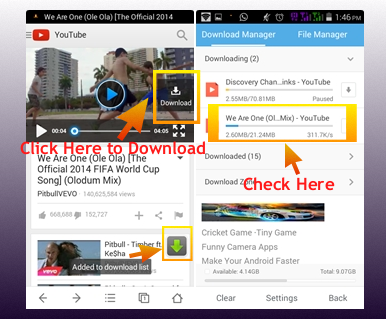
Step 5: Start video streaming/ tab on video screen -----> after this download button appears on the right side of the video,---> then just click on that Download button to begin video download ( You may Pause video Once the download button appear ).
Download : Video Downloader for UC (Updated on 18/08/2014)
UC browser gives quicker download experience, so it is more enjoyable to download YouTube video specifically from UC.
Then why you are waiting for ? - try it and feel it ! furthermore one more thing, please share your feeling about this with us.
What is UC Browser - I think everyone comprehends what is UC, So I dont make it so long, In short UC Browser is a standout amongst the most mobile web browser, It is a free internet browser. furthermore it gives full desktop like searching experience on a Smartphone. UC quickens your browsing by compressing pages on the server, and pre loading pages in the background.
Speed Mode in UC Browser gives various options to enhance the browsing speed of your most loved website - Facebook , Google+, Twitter, Yahoo and Other.
Download management becomes very easy with new version of the UC browser, that support multi tasking downloading and Udisk Downloading.
Themes option also helps you to customize the look and feel of UC by downloading Themes and wallpaper from the UC theme center.
Add - On platform - This is the best thing about UC browser, Number of Add-on available to get advanced personalized internet browsing experience. For this tutorial, we require one of UC add-on named as Video Down-loader. with the help of this UC extension we easily download YouTube video from UC Browser.
This tutorial is tried on full/regular version of UC browser, Not on UC browser ( lite ), This tutorial require add - on support for UC browser.
Required Add-On: Video Downloader.
Tutorial - How to download YouTube video from UC browser
Step 1: Download Latest UC browser on Your Android Mobile.
Step 2: Open UC browser and afterward tap on the right corner of the UC. after that side bar screen shows up, ----> on that screen click on " + " sign which is arranged beneath of all add-on.
Step 3: After few second new page show up with all UC add on ; look for " Video Downloader " add on, once you search it then tap on " install" button -> pop up screen with a confirmation message is appear, -----> click " Ok " on that Screen.
-----> After that install Video Downloader add-on from UC Download manager.and check it ( for Properly Install or Not )
Step 4: After completion above step, open YouTube website in UC browser and select video for download.
Step 5: Start video streaming/ tab on video screen -----> after this download button appears on the right side of the video,---> then just click on that Download button to begin video download ( You may Pause video Once the download button appear ).
Download : Video Downloader for UC (Updated on 18/08/2014)
UC browser gives quicker download experience, so it is more enjoyable to download YouTube video specifically from UC.
Then why you are waiting for ? - try it and feel it ! furthermore one more thing, please share your feeling about this with us.


